Your iPhone shoots HEIC. The rest of the world expects JPG. Which is actually better — and when does it matter? Here's the comparison without the marketing fluff.
The short answer
- HEIC is technically better in almost every measurable way: file size, color depth, dynamic range, feature support.
- JPG is universally betterin compatibility: anything that can display an image can display JPG. The same can't be said for HEIC outside the Apple ecosystem.
- Convert HEIC to JPG when sharing with non-Apple users or uploading to most websites. Otherwise, leave HEIC alone.
File size: HEIC wins by ~50%
HEIC uses HEVC (H.265) compression, which is dramatically more efficient than JPG's DCT-based compression. At the same perceived visual quality:
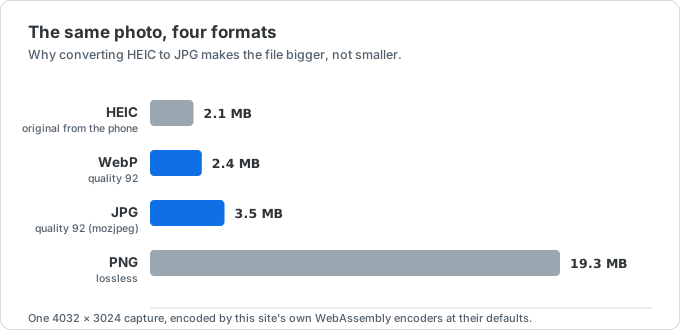
| Image type | JPG size | HEIC size | Savings |
|---|---|---|---|
| 12MP iPhone photo | ~3.0 MB | ~1.5 MB | 50% |
| 48MP iPhone Pro photo | ~14 MB | ~5.5 MB | 61% |
| Screenshot (low complexity) | ~400 KB | ~250 KB | 38% |
| Detailed landscape | ~5 MB | ~2.3 MB | 54% |
This is the single biggest reason Apple switched. Over a year of moderate photography, HEIC saves tens of gigabytes per phone — and Apple's iCloud storage costs scale with usage.
Quality: HEIC is better, but not always visible
Beyond pure size, HEIC has technical quality advantages that JPG simply cannot match:
Color depth
JPG is 8-bit per channel (24-bit color total, ~16.7 million colors). HEIC can be 10-bit or 16-bit per channel, supporting over a billion colors. In practice this means smoother gradients (skies, sunsets, skin tones) without banding.
Will you see this on a normal photo? Usually no — but in low-light shots, HDR captures, and portrait mode, the difference is visible to a careful eye.
HDR support
HEIC stores HDR metadata that lets compatible displays render brighter highlights and deeper shadows than JPG can encode. iPhone's Smart HDR captures lose meaningful detail when converted to JPG.
Multi-image and Live Photo support
HEIC can store multiple images in one file — useful for Live Photos (image + short video), burst shots, and image sequences. JPG can only hold one image per file.
Transparency
HEIC supports an alpha channel (transparency). JPG doesn't — you have to use PNG for that. If you need transparency, convert HEIC to PNG instead.
Compatibility: JPG wins overwhelmingly
JPG is the lingua franca of digital photos. It works:
- In every web browser since the 1990s
- On every operating system without extra setup
- In every email client, social network, and chat app
- In every photo editor, viewer, and file manager
- On printers and photo kiosks
- In camera RAW workflows (as a preview/proxy format)
HEIC works:
- Natively on Apple devices since 2017
- On recent Android phones (Pixel, recent Samsung)
- On Windows after installing two Microsoft Store extensions
- On most modern websites and chat apps (after server-side conversion)
- In Photoshop CC 2020+, Affinity Photo, GIMP with plugin
The compatibility gap is closing every year as HEIC adoption grows — but it's still the reason most people end up converting.
When to use which
Keep HEIC when
- You're staying within the Apple ecosystem (iPhone → Mac → AirDrop to friends)
- Storage matters (small iCloud quota, 64GB iPhone)
- You're shooting HDR or low-light photos where quality preservation matters
- You're archiving photos for the long term (HEIC will likely outlast JPG)
Convert to JPG when
- Sharing with someone on Windows or Android (especially older devices)
- Uploading to a website that rejects HEIC (Discord, most forums, many job application portals)
- Sending to a printer or photo lab
- Embedding in documents (Word, Google Docs, presentations)
- Editing in older software that doesn't support HEIC
Convert to PNG when
- You need transparency (logos, UI screenshots, icons)
- You need lossless encoding for the decoded pixels (HEIC and JPG are both lossy)
Convert to WebP when
- You're uploading to a modern website that supports it
- You want smaller files than JPG with similar quality, for web use
Does conversion lose quality?
Going from HEIC to JPG is a lossy step — both are lossy compression formats, and re-encoding loses some information. However:
- At quality 92 (what most converters use), the visual difference is imperceptible to almost everyone
- The lost information is mostly in subtle highlight/shadow detail and 16-bit color gradations
- Going HEIC → PNG adds no new lossy compression to the decoded pixels, but this converter writes 8-bit PNG and does not carry over HEIC metadata, HDR behavior, or extra bit depth
For sharing and most everyday use, the quality loss isn't worth thinking about. For professional photography archives, keep the HEIC originals and convert copies as needed.
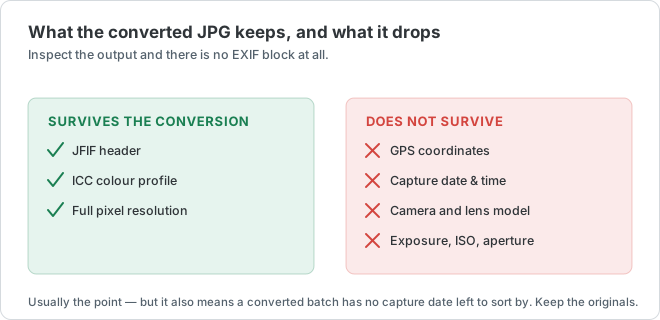
The part people don't expect is what the conversion quietly removes along the way:
Will HEIC eventually replace JPG?
Probably not, and not soon. JPG has 30+ years of momentum, zero licensing friction, and universal support. HEIC has technical superiority but a patent-encumbered codec, which is why adoption outside Apple is slow.
Newer formats such as AVIF, WebP, and JPEG XL all improve compression or feature support in different ways, but none matches JPG's software and workflow compatibility yet. For now, the practical split remains HEIC for iPhone storage, JPG for broad sharing, and a browser conversion when you need to bridge the two.
The practical workflow
For most iPhone users, the pragmatic approach is:
- Leave your iPhone shooting HEIC (better quality, smaller storage)
- When you need to share with someone who's not on Apple, use a quick converter like heictojpg.click
- For web uploads, consider WebP instead of JPG when supported
- For preserving full quality, use PNG
That way you keep HEIC's storage benefits without imposing them on the rest of the world.