Passport and visa photo sizes look chaotic, but almost every country uses one of three standards. Get the format right and the rest — pixels, DPI, file size — follows from simple math. Here's the full reference, plus how to produce a compliant photo without a trip to a studio.
Need one country? Jump straight to the US, UK, Canada, India, or Australia passport photo size — or browse the full passport photo size by country list.
The three standards that cover most of the world
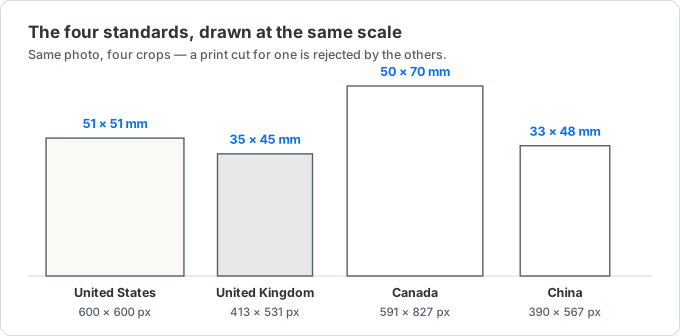
- 2 × 2 inch (51 × 51 mm) — a square photo used by the United States, India, and the Philippines.
- 35 × 45 mm — the most common size worldwide: the UK, all Schengen countries, Japan, South Korea, Australia, and more.
- 50 × 70 mm — unique to Canada, and it cannot be substituted with either of the other two.
China is the notable exception, using its own one-inch (一寸) and two-inch (二寸) sizes for most documents.
Passport photo size chart
Pixel values are computed at 300 DPI, the print standard for ID photos. To convert millimeters to pixels yourself: divide by 25.4 and multiply by 300.
| Region | Standard | Millimeters | Inches | Pixels (300 DPI) |
|---|---|---|---|---|
| United States | Passport & visa | 51 × 51 mm | 2 × 2 in | 600 × 600 px |
| UK / Schengen / EU | Passport & visa | 35 × 45 mm | 1.38 × 1.77 in | 413 × 531 px |
| Canada | Passport | 50 × 70 mm | 1.97 × 2.76 in | 590 × 826 px |
| China | One-inch (一寸) | 25 × 35 mm | 1 × 1.4 in | 295 × 413 px |
| China | Two-inch (二寸) | 35 × 49 mm | 1.4 × 1.9 in | 413 × 579 px |
| Japan / Korea | Passport & visa | 35 × 45 mm | 1.38 × 1.77 in | 413 × 531 px |
| India | Passport | 51 × 51 mm | 2 × 2 in | 600 × 600 px |
US passport photo: 2×2 inches, 600×600px, under 240KB
The US requirement is 2 × 2 inches. For digital submissions like the DS-160, that means at least 600 × 600 pixels, saved as a JPEG no larger than 240KB, on a plain white background. The head should fill roughly 50–69% of the frame height.
The two-step workflow: crop to 600 × 600, then compress the JPEG under 240KB if the file comes out too large.
35 × 45 mm: the international default
If you're applying in the UK, the Schengen area, Japan, Korea, Australia, or most of Asia, you need a 35 × 45 mm photo — about 413 × 531 pixels at 300 DPI. It's a portrait rectangle, not a square, so a US 2×2 will be rejected.
China: one-inch (一寸) and two-inch (二寸)
China's one-inch photo is 25 × 35 mm (≈295 × 413 px) and the two-inch is 35 × 49 mm (≈413 × 579 px) at 300 DPI. These are used for IDs, visas, and many official documents, and they don't map cleanly onto the inch or 35×45mm standards — use the exact pixel values.
How many pixels is a passport photo?
It's just the physical size at 300 DPI. The formula is pixels = (mm ÷ 25.4) × 300. So 35 mm becomes 413 px, 45 mm becomes 531 px, and a 2-inch side becomes 600 px. Some digital systems accept 200 DPI, but 300 DPI is sharper and universally accepted.
Make a compliant photo in your browser
You don't need a studio. Take a well-lit portrait against a plain background, then use the ID photo size toolto crop it to the exact size for your country — HEIC, JPG, and PNG all work, and nothing is uploaded. If the export exceeds a portal's file-size cap, run it through the image compressor to get under the limit.
Before you submit
Dimensions are only part of the requirement. Always check the official application for background color, head height, expression and glasses rules, and the maximum file size. The sizes above get the crop right; the rest is up to the guidelines for your specific document.