Crop preview
Drag to position. Zoom until the crop looks right.
Crop photos to strict ID sizes. Right in your browser.
Make a one-inch photo, passport photo, visa photo, or custom pixel size from HEIC, JPG, and PNG images. Export a single ready-to-upload file.
Passport & ID photo sizes by country
The common standards, in millimeters, inches, and pixels at 300 DPI.
| Region | Standard | Millimeters | Inches | Pixels (300 DPI) |
|---|---|---|---|---|
| United States | Passport & visa | 51 × 51 mm | 2 × 2 in | 600 × 600 px |
| UK / Schengen / EU | Passport & visa | 35 × 45 mm | 1.38 × 1.77 in | 413 × 531 px |
| Canada | Passport | 50 × 70 mm | 1.97 × 2.76 in | 590 × 826 px |
| China | One-inch (一寸) | 25 × 35 mm | 1 × 1.4 in | 295 × 413 px |
| China | Two-inch (二寸) | 35 × 49 mm | 1.4 × 1.9 in | 413 × 579 px |
| Japan / Korea | Passport & visa | 35 × 45 mm | 1.38 × 1.77 in | 413 × 531 px |
| India | Passport | 51 × 51 mm | 2 × 2 in | 600 × 600 px |
Sizes are references for cropping. Always confirm the exact requirement — background color, head height, file format, and maximum file size — on the official application before you submit. Country names link to full passport size pages.
ID, passport, and visa photo sizes — cropped in your browser
Turn any portrait into a correctly sized ID photo. HEIC, JPG, and PNG in; a single ready-to-upload file out.
How to make an ID photo online
Upload a portrait (HEIC, JPG, or PNG), pick a preset size or enter custom pixels, then drag and zoom until your head sits inside the crop frame. Export and you get one file at the exact dimensions you chose — no account, no upload, no watermark.
Because it runs entirely in your browser, your photo never touches a server — which matters when the image is your face on a government form.
The three passport photo standards, and where each is used
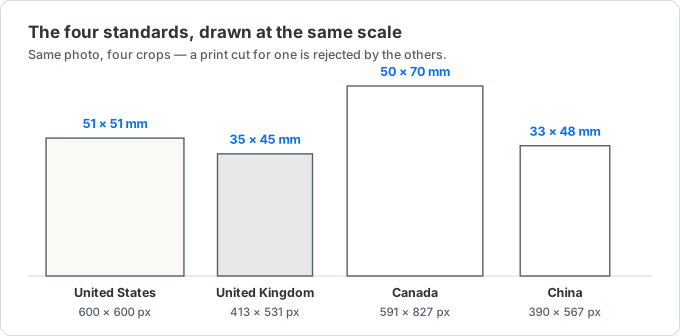
Most of the world uses one of three sizes. The 2 × 2 inch (51 × 51 mm) square is used by the United States, India, and the Philippines. The 35 × 45 mm rectangle is the most common size worldwide — the UK, all Schengen countries, Japan, South Korea, and Australia. Canada is the odd one out with a unique 50 × 70 mm format that can't be substituted.
China uses its own one-inch (一寸, 25 × 35 mm) and two-inch (二寸, 35 × 49 mm) sizes for most documents.
Getting the pixel size and DPI right
Printed passport photos are standardized at 300 DPI. To convert millimeters to pixels, divide by 25.4 and multiply by 300 — so 35 × 45 mm becomes about 413 × 531 px, and a US 2 × 2 in photo is 600 × 600 px. Use the table above for the common ones.
Many digital submissions also cap the file size. The US DS-160, for example, wants a JPEG at least 600 × 600 px and no larger than 240 KB.
Why ID photos get rejected — and how to avoid it
Getting the dimensions right is necessary but not sufficient. The most common reasons a correctly-sized photo still gets bounced: a shadow or gradient on the background, the head too large or too small in the frame, glasses glare or tinted lenses, a smile showing teeth where a neutral expression is required, or hair covering the eyes. Read your document's head-height and expression rules before you crop, not after.
The one thing this tool can't fix is resolution. If you start from a small or heavily cropped image, enlarging it to the target pixel size looks soft and blocky, and a print lab or portal may reject it. Start from the largest original you have — a straight-from-camera HEIC or JPG is ideal — and only ever crop down.
Exported a photo that's over the file-size limit? Compress it under 240 KB with our image compressor — it runs in your browser too.
ID photo size FAQ
The most-asked questions about ID, passport, and visa photo sizes. Anything missing? Email us.
What size is a passport photo?
It depends on the country. The US uses 2 × 2 inches (600 × 600 px at 300 DPI); the UK, Schengen, Japan, and most others use 35 × 45 mm (about 413 × 531 px); Canada uses 50 × 70 mm. See the table above.
What is a 2×2 inch photo in pixels?
At 300 DPI, 2 × 2 inches is 600 × 600 pixels — the standard for US passport and visa photos.
What are the one-inch and two-inch photo sizes (一寸/二寸)?
China's one-inch (一寸) photo is 25 × 35 mm (≈295 × 413 px) and the two-inch (二寸) is 35 × 49 mm (≈413 × 579 px) at 300 DPI.
Are my photos uploaded anywhere?
No. Cropping and resizing happen entirely in your browser. Your photo never leaves your device.
Can I use a HEIC photo from my iPhone?
Yes. HEIC, JPG, and PNG are all supported — the tool decodes HEIC for you.
Does this guarantee my photo will be accepted?
No tool can. Presets match the standard dimensions, but you must still meet the background, head-height, and file-size rules on the official application.