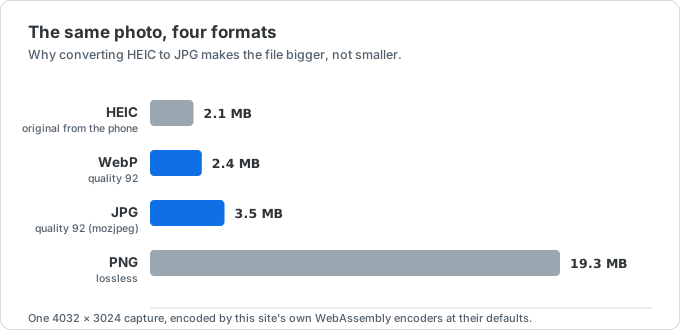
Higher quality keeps more detail and usually creates a larger file.
Convert HEIC to WebP. Modern. Tiny. Browser-side.
WebP is about 30% smaller than JPG at the same quality. Perfect for web use. Free, private, batch supported.
How it works
Three steps, and you pick the quality before you start.
- 01
Set the quality, then drop your files
The slider applies to everything in the batch, so choose before adding files. 92 suits photos; 80 is usually still clean for the web.
- 02
Encoded in your browser
WebAssembly decodes the HEIC and runs the WebP encoder locally. Nothing is uploaded, so a large batch costs time, not bandwidth.
- 03
Download WebP instantly
Single file? Direct download. Multiple? Get a zip.
Why browser-side matters even for web-bound images
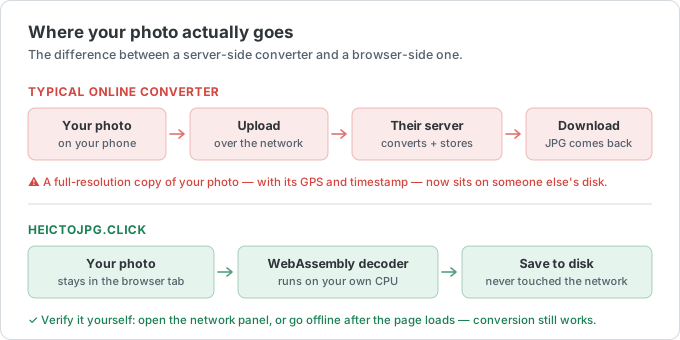
A WebP is usually destined for a public page, so privacy feels beside the point. The originals are not public yet — and the HEIC you drop in still holds the location, the timestamp, and the camera it came from.
Server-side WebP converters
- The full-resolution original is uploaded, not just the version you publish
- GPS and EXIF from the HEIC arrive with it
- One round-trip per file, which turns a 40-image batch into a wait
- Encoder settings are fixed; you get their idea of quality
- Free tiers throttle exactly when you have a real batch to run
heictojpg.click
- Encoding happens locally, so nothing is exposed before you publish
- Camera metadata never leaves the device
- Batches run at your machine's speed, not the queue's
- Quality is a slider you control, 60 to 100
- Works offline once the page has loaded
When to convert HEIC to WebP (and when not to)
WebP is the modern web format: small files, full quality, transparency and animation supported.
When WebP isn't the best choice
WebP is the best pick for images on a website or app — it's typically 25–35% smaller than JPG at matching quality and supports transparency. The catch is compatibility: while every current browser reads WebP, some older desktop software, editing tools, and print shops still don't. If you're uploading to a system that rejects the file or a colleague can't open it, convert to JPG instead.
For long-term archiving or hand-off to someone on unknown software, JPG remains the most bulletproof choice.
How this compares to the other converters
Need maximum compatibility? HEIC to JPG. Need lossless graphics or transparency without worrying about support? HEIC to PNG. Bundling images to send or print? HEIC to PDF. To shrink a WebP further to hit a strict KB limit, use the image compressor.
Why quality 80 here is not quality 80 in JPG
A quality number is a per-codec setting, not a shared scale. WebP at 80 and JPG at 80 are different encoders making different trade-offs, and WebP at 80 generally looks closer to JPG at 90. That is where the size saving actually comes from — not magic, just the ability to turn the number down further before artifacts show up.
This page encodes with libwebp compiled to WebAssembly, the same encoder Squoosh uses, rather than the browser's built-in canvas.toBlob("image/webp"). The built-in path exposes nothing but a quality number and runs at a low effort setting; calling libwebp directly gives access to its method and sharp-YUV options, which produces a visibly smaller file at the same perceived quality.
The slider is read when files are added and applies to the whole batch, so set it before you drop anything in. For photos on a web page, 80–85 is usually indistinguishable at normal viewing size; keep 92 or above for images someone will zoom into.
Browser support stopped being the problem — other software did not
Every browser released since 2020 reads WebP, Safari included from version 14, so serving it on a site you control no longer needs a fallback for practical purposes. The remaining gap is everywhere else: some desktop editors, older Office builds, print shops, and upload forms that whitelist extensions will still reject a .webp outright.
So the question is the destination, not the year. Onto a page you control, WebP. To a person, a print service, or a form whose rules you do not set, convert to JPG instead — it is the one format nothing refuses.
HEIC to WebP FAQ
Questions about modern WebP conversion. Email us.
Why convert HEIC to WebP?
WebP is built for the web: typically 25–35% smaller than JPG at matching visual quality, with optional transparency. Ideal for sites, apps, and anywhere file size and load time matter.
Will every app open my WebP?
Every current browser opens WebP. Some older desktop editors, print shops, and upload forms still reject it. If a system won't accept WebP, convert to JPG instead for maximum compatibility.
Is WebP better than JPG for photos?
For the same visual quality, WebP is usually smaller. JPG remains safer for email, print labs, and unknown software. Use WebP when you control the destination (your website or app).
Is my photo uploaded anywhere, even though the WebP is for the web?
No. Encoding happens in your browser, so the original never leaves your device even though the output is destined for a public page. This also means the GPS coordinates, timestamp and camera model stored in the HEIC are never transmitted to us — they stay on your machine, and you decide what ends up on your server.
Can I shrink a WebP further to hit a KB limit?
Yes. After converting, run the file through the image compressor on this site to target limits like 200 KB or 240 KB without uploading to a server.
Is there a conversion quota?
No. Nothing is metered, because nothing is processed on our side — a batch costs us no bandwidth and no CPU, so there is nothing to ration. Run 50 files, then 50 more. The site is paid for by ads, with no account, no email and no watermark on the output.