You double-click a .heicfile and… nothing. A broken thumbnail, an “unsupported format” error, or an app that flat-out refuses. HEIC is the photo format iPhones save by default, and it opens fine on Apple devices — but everywhere else it takes a little work. Here's how to open a HEIC file on every platform, from the instant no-install way to the permanent system fix.
The fastest way: open it in your browser
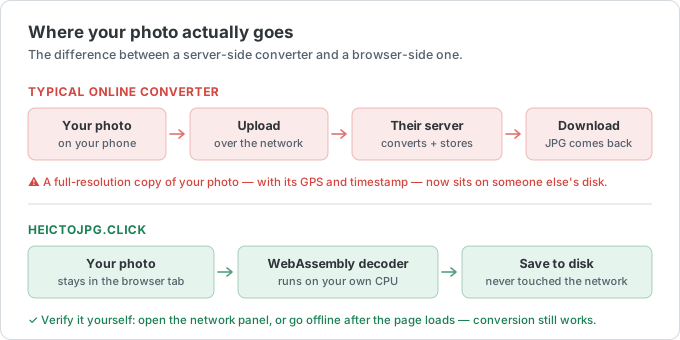
If you just need to see the photo right now, you don't have to install anything. Open the online HEIC viewer, drag your file in, and it decodes and displays in a second — on any device, in any modern browser. Nothing uploads; the file is read locally on your machine. You can also download it as a JPG from there if you want a copy that opens anywhere.
That's the whole answer for most people. The rest of this guide covers opening HEIC natively on each platform, if you get HEIC files often and want them to just work.
Open HEIC on Windows 10 and 11

Windows doesn't read HEIC out of the box. To open it in the Photos app, install two free codecs from the Microsoft Store — HEIF Image Extensions and HEVC Video Extensions (you need both, because HEIC uses HEVC compression inside). After that, double-clicking a .heic works and File Explorer shows thumbnails.
Full walkthrough, plus free viewers like IrfanView and XnView: how to open HEIC files on Windows.
Open HEIC on a Mac
Good news — a Mac opens HEIC with zero setup. It's Apple's own format, so Preview and Photos display it by default, and Quick Look (tap the spacebar on a file) previews it instantly. The only time you need to act is when you want to send the photo to someone on Windows or Android — then convert it to JPG first.
Details and the export steps: how to open HEIC files on a Mac.
Open HEIC on Android
It depends on your phone. Newer Samsung Galaxy and Google Pixel devices open HEIC in their gallery app. Many other or older Androids show an error or a blank thumbnail. When that happens, the browser viewer is the reliable fix — it decodes the file on the phone with no extra app to install.
Step by step: how to open HEIC files on Android.
What app opens HEIC files?
- iPhone / iPad / Mac — Photos, Preview, and Quick Look (built in)
- Windows — Microsoft Photos after installing the HEIF + HEVC extensions; or IrfanView, XnView, CopyTrans HEIC
- Android — the gallery on recent Samsung/Pixel phones; otherwise a browser viewer
- Any device — an online HEIC viewer, no install, no upload
Opening vs. converting: which do you need?
If you only need to look at the photo, opening it is enough — use the viewer or the native app for your device. If you need to upload it to a website, email it, or send it to a non-Apple device, convert it to a universal format instead. Convert HEIC to JPG here (drag in up to 50 files, get a zip back), or use HEIC to PNG if you need transparency.
Why do you even have HEIC files?
Since iOS 11, iPhones save photos as HEIC because it's about half the size of JPG at the same quality. It's great for storage and terrible for compatibility — which is why the file that looked fine on your friend's iPhone won't open on your PC. If you want to stop getting them, the sender can switch their iPhone to Settings → Camera → Formats → Most Compatible. More on that in why your iPhone saves photos as HEIC.