About heictojpg.click
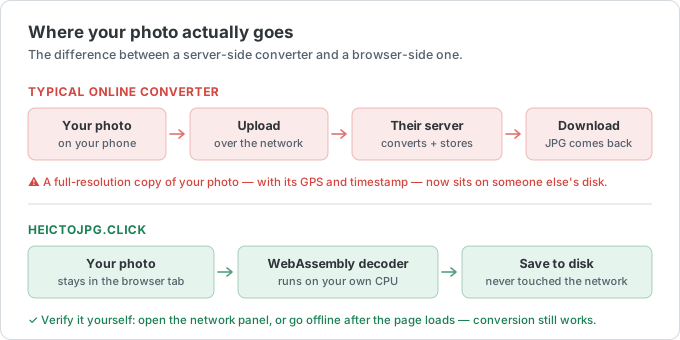
heictojpg.click is a free online tool that converts Apple's HEIC photos to JPG, PNG, WebP, and PDF — entirely inside your browser. There is no server that receives your files: the conversion runs locally using WebAssembly, so your photos never leave your device.
Why we built it
iPhones save photos in HEIC to reduce storage, but Windows, Android, and many websites still can't open it. Most online converters solve this by uploading your photos to their servers, which means your personal images sit on someone else's infrastructure. We wanted a converter that is genuinely private: everything happens client-side, works offline after the first load, and requires no signup, no watermark, and no payment.
What the site offers
- HEIC to JPG, PNG, WebP, and PDF conversion, with batch support up to 50 files.
- A browser-based HEIC viewer, an image compressor, and an image-to-PDF tool.
- Reference guides for ID photo and passport photo sizes by country.
- A blog with practical, hand-written guides on HEIC, JPG, and related image topics.
How the conversion works
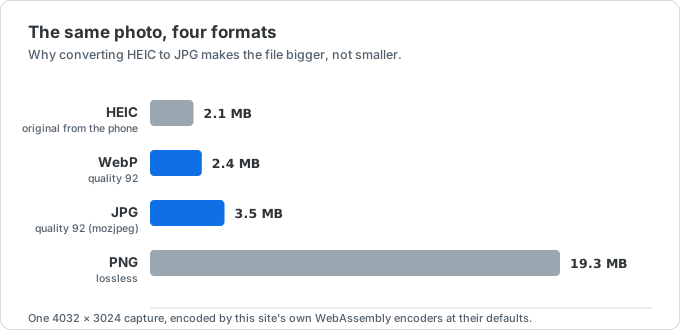
When you drop a file in, the page loads a WebAssembly HEIC decoder (about 1.4 MB, cached after the first use) and decodes the image on your own machine. JPG output goes through mozjpeg, PNG through a lossless encoder, and PDF pages are assembled in the browser. The network tab tells the same story we do: after the page and the decoder load, no request carries your image anywhere. That is also why the first conversion is the slow one, and why everything keeps working if you go offline afterwards.
Where the photo-size data comes from
Passport, visa, and ID photo dimensions are kept in a single dataset with one official source per country — the passport authority or ministry that publishes the rule — and every page links to it. Millimetres, inches, and pixels are derived from one stored value by formula rather than typed by hand, so the three never disagree. Requirements do change: if you find a page that no longer matches its official source, tell us and we will fix the dataset. The guides are written by hand, and we correct them rather than churn out more.
Who runs it
heictojpg.click is built, written, and reviewed by Feng Yuqing, an independent developer, not a company. The public source and change history are available on GitHub. The site is not affiliated with Apple, Google, or any passport authority.
Guides are checked against primary documentation and carry a source-review date. Converter measurements are produced with the encoders used by the live tools, not copied from another site. The full process, correction policy, and separation between editorial work and ads are documented in the editorial policy.
The site is funded entirely by display advertising; there is no paid tier, no account system, and no feature held back for payment. Advertising is also the reason the privacy policy matters — the ads bring third-party cookies to a site whose own tools collect nothing.
Contact
Questions, feedback, bug reports, or a correction to the reference data? Email hello@heictojpg.click — see the contact page for what to include. The privacy policy covers how data is handled and the terms of use cover the rest.