PNG output stays lossless, so quality only affects JPG and WebP.
Compress images. Right in your browser.
Drop your images and get smaller files automatically — or set an exact target size, a quality preset and a max dimension when you need them. No signup, no server upload.
Simple by default
A TinyPNG-style workflow, without sending files to a server.
- 01
Drop images
Add JPG, PNG, WebP, or HEIC files. Batch up to 20 images.
- 02
Compress locally
The browser re-encodes each image and removes metadata automatically.
- 03
Download smaller files
Save one image or download the whole batch as a ZIP.
A free image compressor that never uploads your files
Compress JPG, PNG, WebP, and HEIC images entirely in your browser — and reach an exact file size when a form demands it.
Compress an image to a target size in KB
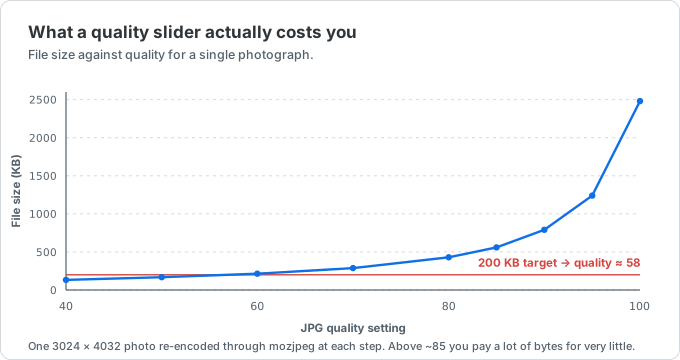
Most people who compress an image aren't chasing a smaller file for its own sake — they're hitting a hard limit. A visa portal caps uploads at 240 KB, a job application won't take a photo over 200 KB, a forum avatar has to stay under 100 KB. Switch to Target size, pick the limit (or type your own in KB), and drop the file: the compressor searches for the highest quality that still fits, so you get a file under the ceiling on the first pass instead of guessing at a quality slider.
Because everything runs locally, you can compress a JPG down to KB-range sizes, shrink a PNG for the web, or reduce a photo for email without ever sending it to a server.
Compress JPG, PNG, and WebP without losing visible quality
JPG and HEIC photos are re-encoded with MozJPEG — the same encoder image services like TinyPNG benchmark against. On a 20-image test our output matched or beat TinyPNG's file size on 18 of them at comparable visual quality, so you get real savings, not a blurry mess.
PNG output is always lossless: OxiPNG re-compresses the exact same pixels, and a colour palette is only used when the image already fits one — screenshots, logos and line art — where quantizing costs no colour at all. Animated PNGs (APNG) keep their animation, and WebP goes through libwebp instead of the browser's built-in encoder.
All three encoders — MozJPEG, libwebp and OxiPNG — are the same open-source WebAssembly codecs that power Google's Squoosh. We aren't affiliated with Google or the Squoosh project; we run the same codecs and add the parts a batch workflow needs: multiple files at once, a ZIP download, an exact-size mode, and HEIC input — which Squoosh cannot decode in Chrome, Firefox or Edge.
See exactly what changed before you download
A byte count can't tell you whether a photo still looks right. Every compressed file gets a Compare view: drag the divider to wipe between the original and the result, and switch to 1:1 to inspect fine detail at full resolution, where compression artifacts actually show up.
If the result looks too soft, switch the preset to High quality. If you need it smaller, pick Smaller, or cap the longest edge under Advanced — resizing is the single biggest saving on phone photos. Changing any setting re-compresses the whole batch, so the numbers on screen always match the settings you're looking at.
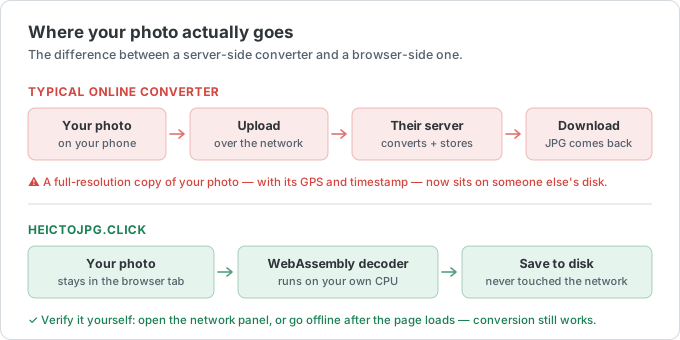
100% browser-side — your images never leave your device
Almost every popular image compressor uploads your photo to a server. This one doesn't. Compression runs on your own machine with WebAssembly, so nothing is transmitted, stored, or logged — you can even go offline after the page loads and it still works.
That makes it safe for ID scans, medical images, contracts, and anything else you'd rather not hand to a third party.
Batch compress and download as a ZIP
Add up to 20 images at once, up to 50 MB each. Every file is compressed independently, and you can download them one by one or grab the whole batch as a single ZIP.
No signup, no email, no watermark, and no per-file cost.
Making an ID or passport photo? The US 2×2 photo has to be a JPEG under 240 KB. Crop it to size with our ID photo tool then compress it here to meet the limit.
Image compressor FAQ
The most-asked questions about compressing images. Anything missing? Email us.
How do I compress an image to 200 KB (or 100 KB)?
Switch to Target size, choose 200 KB (or type any limit in KB), and drop your image. The compressor tries a series of quality settings to find the highest one that still fits under your limit, and only reduces the pixel dimensions if quality alone can't get there. For very small limits like 50 KB, start from a JPG — it compresses far smaller than PNG.
Will compressing reduce image quality?
A little, but rarely in a way you'll notice — and you don't have to take our word for it. Open Compare on any result to wipe between the original and the compressed version, and zoom to 1:1 to check the detail. JPG and HEIC use MozJPEG at a quality calibrated against TinyPNG, PNG output is always lossless, and three presets let you trade size for quality either way.
Does this use the same codecs as Squoosh?
Yes. MozJPEG, libwebp and OxiPNG are the same open-source WebAssembly codecs Squoosh is built on, and they run locally in your browser here too. We aren't affiliated with Google or the Squoosh project. One practical difference: Squoosh has no HEIC decoder of its own, so a .heic file fails to load in Chrome, Firefox and Edge (Safari can decode HEIC, so it may work there). This tool decodes HEIC itself, so iPhone photos work everywhere.
Can I resize an image while compressing it?
Yes. Open Advanced and cap the longest edge at 4000, 2560, 1920 or 1280 pixels. On a modern phone photo (often 4000 px wide) that is usually a bigger saving than any quality setting, and images already smaller than the cap are left alone.
Which formats can I compress?
JPG/JPEG, PNG (including animated APNG), WebP, and HEIC. HEIC is converted to a compressed JPG automatically.
Are my images uploaded to a server?
No. Everything runs in your browser with WebAssembly. Your files never leave your device — you can disconnect from the internet and it keeps working.
Can I compress many images at once?
Yes — up to 20 files, up to 50 MB each, downloadable as a single ZIP.
Does it work on phones?
Yes. Any modern browser on iPhone, Android, Windows, Mac, or Linux. There's nothing to install.