HEIC is Apple's format, so most HEIC files land on Android after someone AirDropped, messaged, or emailed them from an iPhone. Modern Android can often open HEIC, but plenty of apps still choke on it. Here's how to convert HEIC to JPG on Android without installing a sketchy converter app.
1. Google Photos
If the HEIC file is in Google Photos, the simplest trick is to make a small edit and save a copy:
- Open the image in Google Photos.
- Tap Edit, make any tiny adjustment (or just crop and undo), then Save copy.
- The saved copy is a JPG you can share anywhere.
It's a workaround rather than a real converter, but it works in a pinch. Two catches: it's one photo at a time, and the copy is re-encoded by Google Photos, so you don't control the quality.
2. Files by Google / your gallery app
Some gallery and file-manager apps (including Files by Google on newer devices) offer a Share → Save asor export option that writes a JPG copy. Support varies by phone and Android version, so check whether your gallery's share sheet has a "save as JPG" or "convert" option before relying on it.
3. Send it through a chat app (the accidental converter)
WhatsApp, Messenger and most chat apps re-encode photos to JPEG before sending. So if you message the HEIC to yourself and save the copy you receive, you get a JPG without any tool at all.
Use this only for casual sharing. Those apps also downscaleimages heavily to save bandwidth, so the JPG that comes back can be a fraction of the original resolution. That's fine for a chat, and wrong for a document upload or anything you'll print.
4. Browser converter — the reliable, private option
The method that works the same on every Android phone, regardless of manufacturer skin or Android version, is a browser converter. Open heictojpg.click in Chrome, tap to pick your HEIC files, and download the JPGs — or get them all in one ZIP for a batch.
Two reasons this beats installing a converter app: it runs entirely in the browser, so your photos are never uploaded to a server, and there's no app collecting permissions or showing ads. It also does HEIC to PNG and HEIC to PDF if you need a different format.
Converting a whole folder
Android has no built-in batch converter, which is where the gallery tricks fall down — they are all one-photo-at-a-time. In the browser converter you can pick up to 50 files in the system file picker at once and download the result as a single ZIP, then unzip it with Files by Google. For a holiday album pulled off someone's iPhone, that's the difference between one minute and forty.
The JPG will probably be bigger than the HEIC
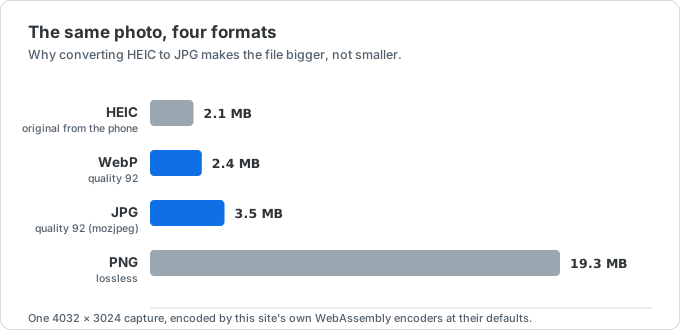
HEIC uses HEVC compression, which is roughly twice as efficient as JPEG at the same visual quality. Convert a 2 MB HEIC and the JPG can easily land at 3–4 MB. You're trading storage for compatibility, which is usually the right trade — but if the file is headed for an upload form with a size cap, follow up with the image compressor and set an exact target size, or read how to compress an image to 200 KB.
What about renaming .heic to .jpg?
It doesn't work. The extension is only a label — the data inside is still HEVC, so any app that couldn't read the file before still can't read it, usually with a more confusing error. The image has to be genuinely re-encoded by one of the methods above.
Why do I even have a HEIC file on Android?

Almost always because it came from an iPhone. iPhones save photos as HEIC by default to halve storage use — see why iPhones save photos as HEIC. When those photos reach a non-Apple device, HEIC's patchy support outside Apple is exactly why a quick conversion to JPG makes them just work.
If it keeps happening, the sender can switch to Settings → Camera → Formats → Most Compatible on their iPhone and new photos will save as JPG from then on.
Which method should you use?
- One image already in Google Photos: the edit-and-save-copy trick.
- Your gallery supports export: save as JPG from the share sheet.
- Just need to show someone: send it through a chat app and let it re-encode.
- Any phone, any batch, full resolution: the browser converter.
Only need to see the photo rather than keep a JPG copy? The HEIC viewer shows it without saving anything — more on that in how to open HEIC files on Android.