Open and view HEIC files. Right in your browser.
Drop a HEIC photo and see it instantly — no iPhone, no Mac, no software to install. Preview every image, then download any as JPG.
Open HEIC files without installing anything
A HEIC viewer that decodes Apple's photo format right in your browser — then lets you save any image as JPG.
See HEIC photos on Windows, Android, or anywhere
HEIC is Apple's format, so a HEIC file that lands on Windows or Android often won't open — the built-in photo apps just show an error or a blank thumbnail. This viewer decodes the file in your browser and shows the actual image, no Windows plugin or phone app required.
Drop one file or a whole batch and every photo renders in a grid you can scan at a glance.

How to open a HEIC file — no app, no account
Opening a HEIC takes three steps: drag the file onto this page, wait a second while it decodes, and the photo appears. No sign-up, no software to download, and nothing is uploaded — it works the same whether you have one file or fifty.
Because it's just a web page, the identical steps work on a Windows PC, an Android phone, a Chromebook, or a Mac. When a '.heic' file won't open by double-clicking, this is the fastest way around it.
What opens a HEIC file on each device
On an iPhone or Mac, HEIC opens natively — it's Apple's own format. Everywhere else is where it breaks. On Windows 10 and 11 you normally have to install Microsoft's HEIF and HEVC extensions before the Photos app will show it. On Android it depends on the phone: newer Samsung and Pixel devices open HEIC, many others can't. On Chromebooks and Linux it's hit or miss.
This viewer skips all of that — it decodes the file itself, so you never have to match your device to the right plugin or app. Open it here first, and convert or install something only if you actually need to.
Preview first, then convert only if you need to
Sometimes you just want to look — check which photo is which before you do anything else. The viewer is built for that: open, look, done. When you do need a shareable copy, download any image as a JPG with one click.
Need a different format or a smaller file? Convert to PNG or PDF, or compress the result — all in the same browser-side, no-upload way.
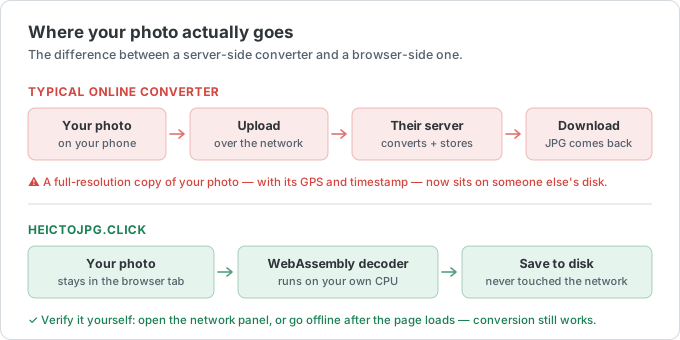
100% private — your photos never upload
Many online HEIC viewers upload your photo to a server to render it. This one doesn't. Decoding runs on your own device with WebAssembly, so the image never leaves your computer or phone — it even keeps working offline once the page has loaded.
That matters when the HEIC is a personal photo, an ID scan, or anything you'd rather not hand to a stranger's server.
Want to keep the converted copies? Convert HEIC to JPG in a batch — same browser, same privacy.
HEIC viewer FAQ
The most-asked questions about opening and viewing HEIC files. Anything missing? Email us.
What is a HEIC file?
HEIC (High Efficiency Image Container) is the photo format iPhones save by default since iOS 11. It stores images with the HEVC codec, taking about half the space of JPG at the same quality.
Why won't my HEIC file open on Windows or Android?
HEIC is an Apple format with patchy support elsewhere. Windows needs an extra codec and many Android gallery apps can't read it, so the file looks broken. This viewer decodes it in the browser instead.
How do I open a HEIC file on Windows 10 or 11?
The fastest way is to drop it into this viewer — it opens in your browser with nothing to install. To open HEIC in the Windows Photos app instead, install the 'HEIF Image Extensions' and 'HEVC Video Extensions' from the Microsoft Store, then double-click the file.
What app opens HEIC files?
On iPhone and Mac, the built-in Photos and Preview apps open HEIC. On Windows, Microsoft Photos does once the HEIF and HEVC extensions are installed; free viewers like IrfanView or XnView work too. On any device, this browser viewer opens HEIC with no app at all.
How do I open a HEIC file on Android?
Newer Samsung and Pixel phones open HEIC right in the gallery. If yours shows an error or a blank thumbnail, open the file in this browser viewer instead — it decodes HEIC on the phone with no extra app.
Are my photos uploaded to a server?
No. The HEIC is decoded locally in your browser with WebAssembly. Your photos never leave your device, and the viewer keeps working offline after the page loads.
Can I save the HEIC as a JPG after viewing?
Yes. Every opened image has a Download JPG button. For other formats, use the HEIC to PNG or HEIC to PDF tools.
Does it work on my phone?
Yes. Any modern browser on iPhone, Android, Windows, Mac, or Linux — there's nothing to install.