Combine images into a PDF. Right in your browser.
Drop your JPG, PNG, or WebP images, drag them into order, and download one clean PDF. Nothing is uploaded — it all happens on your device.
Turn images into a PDF without uploading them
Combine JPG, PNG, and WebP photos into a single PDF — reorder the pages, and keep every file on your own device.
Combine many images into one PDF
Scanned pages, receipts, screenshots, ID photos, a set of product shots — when something needs to arrive as a single document, a folder of JPGs won't do. Drop them here and they become one PDF, one image per page, in the order you choose.
Drag files into the order you want with the up and down controls before you export, so page 1 is page 1.
JPG, PNG, and WebP all welcome
Mix formats freely — a PDF built from a JPG scan, a PNG screenshot, and a WebP export all works. Each image is placed on a page sized exactly to it, so nothing is cropped or stretched.
Transparent PNGs and WebPs are flattened onto a white background, which is what you want for a printable, shareable document.
100% browser-side — nothing is uploaded
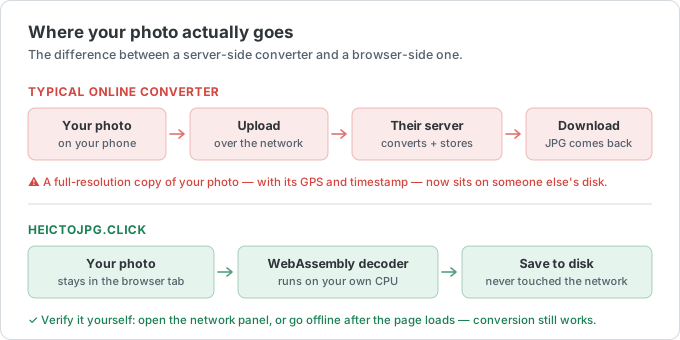
Most image-to-PDF sites upload your files to a server to assemble the document. This one builds the PDF on your own device with WebAssembly, so private scans, contracts, and personal photos never leave your computer or phone.
No signup, no email, no watermark stamped across your pages.
Working with iPhone photos? Convert HEIC to PDF instead — same browser-side, no-upload approach.
Image to PDF FAQ
The most-asked questions about combining images into a PDF. Anything missing? Email us.
How do I combine several JPGs into one PDF?
Drop all the images at once, arrange them with the up and down controls, and click Download PDF. Every image becomes a page in a single PDF, in the order shown.
Can I reorder the pages?
Yes. Each image has up and down controls, and the numbered order is exactly the page order in the final PDF.
Which image formats are supported?
JPG/JPEG, PNG, and WebP — and you can mix them in one PDF. For iPhone HEIC photos, use the HEIC to PDF tool.
Are my images uploaded to a server?
No. The PDF is assembled in your browser with WebAssembly. Your images never leave your device, and it works offline after the page loads.
Is there a watermark or file limit?
No watermark. You can combine up to 50 images at once, each up to 50 MB, completely free.