Why so many countries share this size
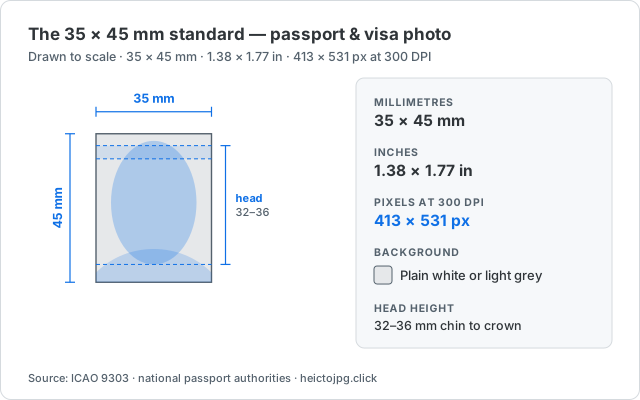
The 35 × 45 mm format comes out of ICAO Doc 9303, the specification behind machine-readable passports. It fixes the proportions of the face inside the frame so that border systems can compare a printed photo with a live face or a stored template. Once the biometric requirements were agreed, most issuing authorities standardised on the same print size rather than maintaining their own.
In other units the same photo is 3.5 × 4.5 cm, or about 1.38 × 1.77 inches. At the 300 DPI that photo labs print at, that is 413 × 531 pixels. Some online applications ask for a larger minimum instead of a physical size — the UK digital service, for example, wants at least 600 × 750 pixels — so read the upload form as well as the print spec.
What still differs by country
Four things vary between the countries in the table above. All four are common rejection reasons, and none of them are visible in the millimetres.
Background colour
Germany, France and the Netherlands want plain light grey. Spain, South Korea and Singapore want plain white. Japan accepts white or a light blue. The UK asks for light grey or cream and explicitly warns that pure white can fail its automated check. Photograph against the colour the destination country asks for — you cannot recolour your way out of it convincingly.
How much of the frame your head fills
The Schengen countries specify a head 32–36 mm from chin to crown. Japan uses 34 mm ± 2 mm. South Korea and Singapore allow 25–35 mm. Australia publishes a size range for the photo itself (35–40 mm wide by 45–50 mm tall) rather than a single value. Cropping to the right rectangle with the head too small is still a rejection.
Printed photo vs digital upload
A paper application takes a 35 × 45 mm print. An online application takes a file with a minimum pixel size and often a maximum file size in KB. Those are different requirements for the same photo, and a file that satisfies one can fail the other.
Age, expression and glasses
Most authorities want a photo taken within the last six months, a neutral expression with the mouth closed, both eyes visible, and no tinted lenses or heavy glare. Some now refuse glasses entirely. This is the part of the rule most likely to have changed since the last time you applied.
How to crop a 35 × 45 mm photo
You do not need a photo studio for the crop itself — a straight, evenly lit photo against the right background is enough to work from.
- Open the ID photo tool and pick the 35 × 45 mm preset, or enter 413 × 531 px manually.
- Position your head inside the guide so it fills the height your destination country asks for, then export at 413 × 531 px. HEIC straight from an iPhone works — nothing is uploaded.
- If the upload form rejects the file for being too large, compress it before you resize it — dropping resolution to hit a KB limit is what makes a photo blurry.
Before you submit
Treat this page as a cropping reference, not as the regulation. Requirements change, and consulates sometimes apply stricter rules than the passport authority of the same country. Open the official source in the row for your country and confirm the background, head height, photo age and file limits on the actual form you are filling in.