India passport photo size in pixels
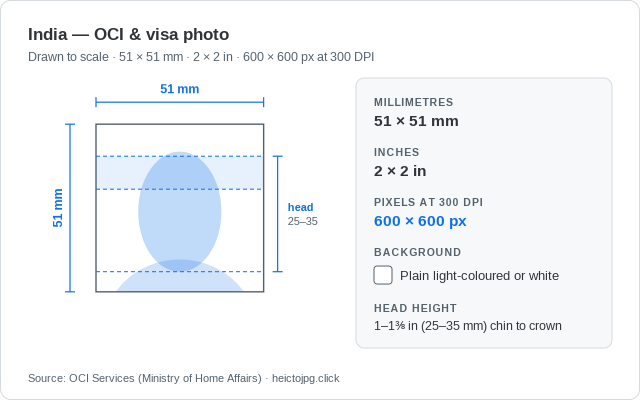
There is no separate pixel standard to look up: 600 × 600 px is what 51 × 51 mm becomes at 300 DPI, the resolution ID photos are printed at. Unless a India form asks for something else, export at 300 DPI — a 200 DPI file is the same physical size but fails minimum-dimension checks.
India is the country where “passport photo size” is most likely to send you to the wrong number, because there is more than one. The 2 × 2 inch (51 × 51 mm) square above is the size published by OCI Services for OCI registration, and it is what most Indian visa and consular forms ask for as well. At 300 DPI that is 600 × 600 px.
A fresh or reissued Indian passport is a different specification entirely. Passport Seva follows ICAO guidance at 630 × 810 px on a white background, with the face filling 80–85% of the frame — a portrait rectangle, not a square, and a much tighter crop than the OCI photo. A file made for one will be rejected by the other, which is why a single “Indian passport photo” preset cannot be right for both.
So decide which document you are actually filling in before you crop. OCI registration or a visa form: use the 2 × 2 inch square on this page. Applying for the passport itself through Passport Seva: use 630 × 810 px instead. The OCI specification also asks for a plain light-coloured background rather than specifically pure white, while Passport Seva asks for white.
Online portals usually enforce a maximum file size alongside the dimensions. Crop to the correct size first and only then compress — compressing before cropping throws away detail you are about to need, and the crop will not shrink the file nearly as much as you expect.
Always re-check the exact form you are filling: individual missions and state pages still list slight variations. When in doubt, the official specification linked below wins over any third-party chart, including this one.
Indian upload validators are strict about choosing the specification for the actual service. OCI and e-Visa systems expect a square JPEG in sRGB and enforce both a pixel range and a narrow KB range, while Passport Seva's 630 × 810 portrait is a different aspect ratio. Portals commonly reject CMYK exports, renamed PNG files, scans with a border, and images whose dimensions were rounded during resizing, so inspect the file properties after the final export rather than relying on the editor preset name.
Eyeglasses should not hide the eyes or produce reflected white patches, and tinted lenses are unsuitable unless the current authority documents a medical exception. Religious head coverings are generally acceptable when the complete facial features remain visible from chin to forehead and no shadow falls across the face. Casual caps, hair covering an eye, digitally whitened backgrounds, over-smoothed skin, and a crop that cuts into the hair or shoulders are frequent rejection causes on Indian consular forms.
How much of the frame your head has to fill (India)
The size table gets you a correctly shaped file; this is the rule that actually rejects photos. India requires 25–35 mm from chin to crown, which inside this particular frame works out to 295–413 px of the 600 px height — between 49% and 69% of the image.
That percentage is the number worth remembering, because it is what makes a photo non-transferable between countries. A selfie cropped to the right outer size with the head at, say, 40% of the frame is the correct dimensions and still wrong. Crop so the crown and chin land inside the shaded band in the diagram above, and the proportion takes care of itself at any export size.
How to make a compliant India photo
You don't need a photo studio. Take a well-lit portrait against a plain light-coloured or white background, then crop it to the exact size:
- Open the ID photo size tool — it runs in your browser, so your photo is never uploaded.
- Enter 600 × 600 px (or pick a preset) and drag to fit your head inside the frame.
- Export a ready-to-upload file. HEIC, JPG, and PNG all work as the input.
File size: Passport Seva and OCI portals require a square JPEG between 10 KB and 300 KB (20 KB to 300 KB on e-Visa portals) at 600 × 600 px to 1200 × 1200 px in sRGB. If your export is too large, run it through the image compressor to get under the limit without visibly hurting quality.
Before you submit
Dimensions are only part of the requirement. Always confirm the current rules — background color, head height, expression and glasses, and the maximum file size — on the official application before you submit. The size above gets the crop right; the rest is up to your document's guidelines.
Official source: OCI Services (Ministry of Home Affairs)