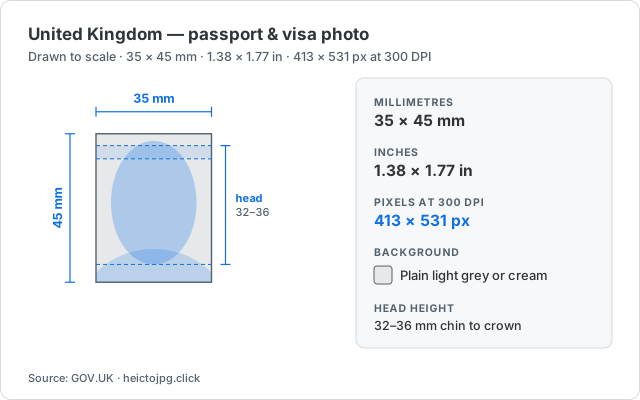
United Kingdom passport photo size in pixels
There is no separate pixel standard to look up: 413 × 531 px is what 35 × 45 mm becomes at 300 DPI, the resolution ID photos are printed at. Unless a United Kingdom form asks for something else, export at 300 DPI — a 200 DPI file is the same physical size but fails minimum-dimension checks.
UK passport photos use the international 35 × 45 mm rectangle (about 413 × 531 px at 300 DPI). Online applications usually want a digital file of at least 600 × 750 pixels; printed photos for paper applications stay at 35 × 45 mm.
GOV.UK expects a plain light grey or cream background — pure white can fail automated checks. The face should be clear, with no sunglasses, and the photo should not be more than a month old for a new passport.
If you are applying from outside the UK, local visa centers may still follow the same 35 × 45 mm ICAO-style standard used across much of Europe.
The UK has a route no other country on this list offers: a photo code. Booths and participating shops issue a short alphanumeric code with your prints, and you type that into the online application instead of uploading a file at all — the photo is pulled straight into HM Passport Office’s system. GOV.UK is explicit that photos from a booth or shop are more likely to be approved than one taken on your own device, so if your upload has already failed an automated check once, the code is the shortcut worth knowing about.
If you are uploading your own file instead, the recency rule bites more often than the size rule: the photo must be no more than a month old for a new passport. A correctly cropped image from last year fails a check that a hastily taken one from this morning passes.
How much of the frame your head has to fill (United Kingdom)
The size table gets you a correctly shaped file; this is the rule that actually rejects photos. United Kingdom requires 32–36 mm from chin to crown, which inside this particular frame works out to 378–425 px of the 531 px height — between 71% and 80% of the image.
That percentage is the number worth remembering, because it is what makes a photo non-transferable between countries. A selfie cropped to the right outer size with the head at, say, 40% of the frame is the correct dimensions and still wrong. Crop so the crown and chin land inside the shaded band in the diagram above, and the proportion takes care of itself at any export size.
How to make a compliant United Kingdom photo
You don't need a photo studio. Take a well-lit portrait against a plain light grey or cream background, then crop it to the exact size:
- Open the ID photo size tool — it runs in your browser, so your photo is never uploaded.
- Enter 413 × 531 px (or pick a preset) and drag to fit your head inside the frame.
- Export a ready-to-upload file. HEIC, JPG, and PNG all work as the input.
Before you submit
Dimensions are only part of the requirement. Always confirm the current rules — background color, head height, expression and glasses, and the maximum file size — on the official application before you submit. The size above gets the crop right; the rest is up to your document's guidelines.
Official source: GOV.UK